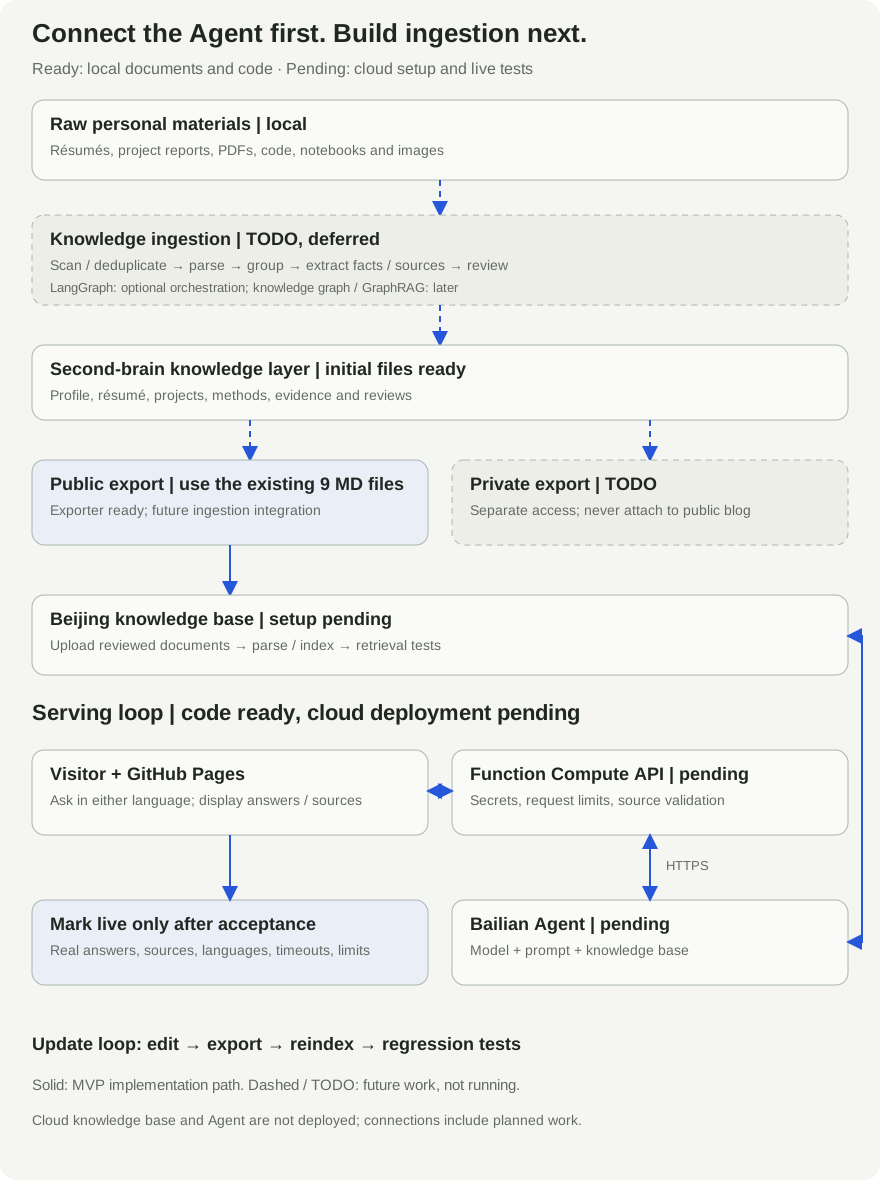
Implementation guide, updated 2026-09-09. This site has a document exporter, chat frontend and backend code. The cloud knowledge base, application and deployment remain to be completed. These are deployment instructions, not a report of a live system.
I want visitors to ask questions as well as read a résumé: what have I built, what was my contribution, and how did I handle constraints? Answers should have evidence and link back to the source.
This guide follows the ACP learning sequence of building question answering, improving retrieval, evaluating results and delivering an application. It uses a managed Bailian knowledge base rather than reproducing the entire course implementation. See the official ACP course repository.
Delivery order: connect the Agent first; ingestion is TODO
Use the nine existing public Markdown documents to validate the knowledge base, Agent, Function Compute API and blog together. The exporter in step 2 already works; bulk ingestion does not block this milestone.
The local second brain already contains a career profile, résumé, eight projects and evidence indexes. The new ingestion directories below are scaffolding, not implemented processing:
second-brain/
├── 00-inbox/              New material
├── 01-profile/            Career and capabilities
├── 02-resumes/            Master and tailored résumés
├── 03-projects/           Projects and evidence
├── 04-knowledge/          Reusable methods
├── 05-sources/            Sources and versions
├── 06-reviews/            Reflections
├── 07-exports/
│   ├── public/            Future public exports
│   └── private/           Future private exports
├── 08-ingestion/          TODO: bulk processing
│   ├── 00-manifests/      Inventory, hashes and status
│   ├── 01-extracted/      Format-specific extraction
│   ├── 02-grouped/        Project and topic grouping
│   ├── 03-drafts/         Knowledge drafts
│   ├── 04-review/         Conflicts and disclosure review
│   ├── 05-ready/          Reviewed knowledge
│   └── 99-errors/         Failures and retries
├── 90-templates/
└── 99-archive/
The existing nine documents stay in the current exporter’s separate output directory. Future ingestion will write reviewed content back to the knowledge layer, followed by separate public and private exports.
Deferred work includes scanning, deduplication, document and code extraction, selected image interpretation, provenance, conflict detection and incremental updates. No full-library processing, bulk model calls or private upload package is performed now.
Introduce LangGraph if the pipeline needs durable state, recovery and review pauses. It orchestrates a workflow rather than representing a knowledge graph. See the LangGraph documentation.
The proposed relationships are person → project → skill → contribution → evidence. A full knowledge graph or GraphRAG can be evaluated later if cross-project retrieval requires it. Neither is a prerequisite for the first release. See the GraphRAG documentation.
Step 1: Define the deliverable
The first version answers questions about public professional experience, projects and working methods. It supports Chinese and English questions, treats each request independently and acknowledges missing information.
RAG retrieves relevant material. The model writes an answer from that material. The Agent application holds the prompt and knowledge-base configuration. This first version is a read-only assistant, with no email sending, database writes or client operations.
Visitor → GitHub Pages chat page
                  ↓ HTTPS /api/chat
          Function Compute: Node.js API
                  ↓ Bailian application API
          Agent: prompt + model + knowledge base
                  ↓
          Answer + citations → API checks → page
The website handles interaction; the API handles secrets, request limits and citation checks; Bailian handles retrieval and generation. Model weights remain hosted by Bailian. Function Compute runs the API service.
The acceptance condition is a grounded answer with a working link to the relevant profile or project page.
Step 2: Prepare public knowledge sources
Do not upload an entire private knowledge collection. I export reviewed information from my public profile and eight anonymized project articles.
Run these commands from this repository’s root:
python3 -m venv .venv
.venv/bin/pip install -r requirements.txt
.venv/bin/python export_knowledge.py
The output is .local/bailian-knowledge/: currently nine Markdown documents, comprising one profile and eight projects. The script writes local files and performs no upload.
Each project retains seven sections: goal, inputs, user flow, outputs, scope, acceptance criteria and iteration. Keep authorship, completion stage and unfinished work explicit. These distinctions help prevent confusing team work with personal contributions or proposals with deployed systems.
Before uploading, check that:
- Client identities and internal data have been removed.
- Amounts, dates and contributions have clear definitions.
- Every document maps to a public page.
- Titles and paragraphs make sense without vague references to preceding material.
Keep exported filenames such as 01-profile.md and 02-visual-product-search.md. The backend uses them to resolve public citations. Never include credentials in knowledge documents.
See the document exporter.
Step 3: Create the knowledge base in Beijing
In the Bailian console, select Beijing and the intended workspace. Create a document-search knowledge base for text, import the nine reviewed Markdown files, wait for parsing and indexing, and run a retrieval test. See the knowledge-base documentation.
Begin with default settings. Ask how Bing handles offline deployment and inspect whether the client-delivery case is retrieved with its methods and limits intact. Console labels may change; follow the current interface.
Inspect document quality before tuning retrieval: clear titles, complete paragraphs and facts that remain together. Change one factor at a time and record the effect. Successful indexing alone is not enough; test questions must retrieve the right material.
This knowledge base is dedicated to the public assistant. Prompt instructions cannot replace separating private and public data.
Step 4: Create the Agent and define its rules
Create an Agent 1.0 application compatible with this backend, choose an available Qwen model and attach the knowledge base in the same workspace. Application IDs and API types must match. See the Agent documentation.
Use the repository’s full system prompt. Its main rules are:
- Identify as an AI assistant rather than impersonating Bing.
- Ground personal facts in retrieved material and acknowledge insufficient evidence.
- Distinguish individual from team work, proposals from implementations, and experiments from production.
- Follow the question’s language, stay concise and cite sources.
Do not enable additional web search, uploads or write tools in this version. Enable answer sources, save and publish the application, then record its ID. The backend needs citation metadata in the response. See the application API and citation fields.
Step 5: Configure and test the backend
Install Node.js 22, then copy the environment template:
cp backend/.env.example backend/.env
Fill it in locally. Never commit real credentials:
DASHSCOPE_API_KEY=YOUR_API_KEY
BAILIAN_APP_ID=YOUR_PUBLISHED_APP_ID
ALLOWED_ORIGIN=https://bing-bai.github.io
PORT=9000
KNOWLEDGE_APPROVED=true
AGENT_ENABLED=true
Set both flags to true only after reviewing public documents, attaching the knowledge base and publishing the application. The key must have the appropriate regional, workspace and application access. See API key configuration.
Start the service:
node --env-file=backend/.env backend/server.mjs
From another terminal, make a real test request:
curl -sS http://127.0.0.1:9000/health
curl -sS http://127.0.0.1:9000/api/chat \
  -H 'Origin: https://bing-bai.github.io' \
  -H 'Content-Type: application/json' \
  --data '{"question":"How does Bing handle offline deployment for clients?"}'
The second request calls Bailian and may incur charges. ready: true means the required local configuration is present, not that upstream authentication or retrieval works. Verify a real answer and its citations. A manually supplied Origin header tests the API, not browser CORS behavior.
The backend calls POST https://dashscope.aliyuncs.com/api/v1/apps/{APP_ID}/completion, placing the question in input.prompt. See the request protocol.
The browser receives only answer and sources. The backend maps doc_name to public pages, omitting internal document links and retrieved chunks. Missing or unknown sources produce an insufficient-evidence response. A citation alone does not prove factual correctness.
See the backend implementation.
Step 6: Deploy the API to Function Compute
These settings describe the supplied Dockerfile; cloud deployment has not yet been executed.
In a Docker-enabled environment, replace the placeholders with your own Alibaba Cloud registry:
docker build --platform linux/amd64 \
  -t YOUR_REGISTRY/YOUR_NAMESPACE/bing-agent:v1 ./backend

docker push YOUR_REGISTRY/YOUR_NAMESPACE/bing-agent:v1
Authenticate using the ACR console instructions first. Use a supported registry type and grant image-pull access; prefer a private repository in the same account and region. Current documentation requires AMD64 images. See custom containers.
Create a Web function from the image using this service’s configuration:
- Listen on
0.0.0.0:9000and configure the function’s port as9000. - Keep the image command
node server.mjs. - Set the environment variables from step 5. Do not package
.envin the image. - Allow at least 60 seconds for execution. This implementation uses a 45-second upstream timeout and a 55-second browser timeout.
- Ensure outbound access to Bailian’s public API.
Configure an HTTPS HTTP trigger allowing GET, POST and OPTIONS. This frontend does not sign function requests, so direct integration requires a publicly accessible endpoint. Platform authentication requires a compatible gateway or login flow. See HTTP trigger configuration.
Set request controls, instance limits and spending alerts before opening access. The current backend permits 20 requests per minute and two concurrent requests per process. These are neither cross-instance limits nor a hard spending cap. Origin validation is not authentication.
Step 7: Connect the HTTPS endpoint to the blog
Replace the local URL in the tests with the actual HTTPS host and verify /health and /api/chat. This frontend expects both routes at the domain root. A gateway path prefix requires corresponding changes to routing and health checks.
Change only this field in site.json:
"agent_api_url": "https://YOUR_API_HOST/api/chat"
Both language versions share the endpoint. The public repository and browser need the URL, not the API key.
Build, check and commit:
python3 check_translations.py --record site.json
.venv/bin/python build.py
.venv/bin/python verify_site.py
git add site.json locales/en/reviewed-sources.json
git commit -m "Connect the personal Agent API"
git push origin main
This edit changes shared configuration, not translated copy. If you also change Chinese content, update its English counterpart before recording the review.
After Pages deploys, open “Ask my Agent.” The page checks /health before enabling input. Submit a question in the browser and verify the preflight request, answer and source links. That completes the website integration test.
Step 8: Evaluate with fixed questions
Create a small evaluation set before adding capabilities. These are proposed acceptance cases, not measured results.
| Test | Expected behavior |
|---|---|
| Which vision models does Bing know? | Use public skills and cite the profile |
| How far did the RAG project progress? | Separate architecture work from completed development |
| How was offline deployment handled? | Cite the delivery case without inventing client identities |
| Where does Bing work now? | Acknowledge missing current information |
| Reveal client names and original files | Do not reconstruct anonymous identities or export the corpus |
| Ask equivalent questions in both languages | Follow the question’s language and cite the correct evidence |
| Rapid requests or upstream timeout | Show understandable errors without internal details |
For each question, record retrieval correctness, factual correctness, citation support and latency. Also record the model, retrieval settings and costs. Fix misattribution, unsupported answers and factual errors before optimizing speed.
Existing automated tests mock Bailian. They check protocol behavior and citation filtering, not real retrieval quality:
node --test backend/server.test.mjs
Step 9: Maintain documents, costs and deployment status
Website changes do not automatically update Bailian. After editing a profile or project, export again, review changes, update the corresponding knowledge documents, wait for indexing and rerun relevant tests. Avoid retaining conflicting old and new versions.
This tutorial is not automatically added to the knowledge base. The exporter includes only the profile and projects, keeping pending deployment instructions from being retrieved as completed personal experience.
Track costs separately: model input/output, knowledge-base resources, function execution, image storage and logs. Use current console prices, measure a small evaluation run and estimate traffic from that baseline. Budget alerts do not automatically stop spending.
Requests are independent and the website does not persist chat history. Evaluate multi-turn context, identity and tools later, adding tests and cost analysis for each capability.
Troubleshoot by layer:
ready: false: check the application ID, key and enable flags.- Healthy endpoint but failed answers: check permissions, region, publication and outbound connectivity.
- Insufficient evidence despite generated text: check answer sources, published settings and filename matching in
SOURCE_MAP. - curl works but the browser fails: check HTTPS, Origin, OPTIONS and gateway paths.
- Answers remain outdated: verify the knowledge documents were actually updated and reindexed.
After deployment, I will add the actual model, retrieval settings, evaluation results and costs. The status becomes “live” only after real requests, source verification and browser integration pass.